Showing posts with label part. Show all posts
Showing posts with label part. Show all posts
Wednesday, February 4, 2015
Android beginner tutorial Part 43 AlertDialog custom layout
In this tutorial we will learn how to create a custom layout for an AlertDialog.
Firstly, create the layout xml. I called mine custom_alert_layout.xml. It is a simple LinearLayout container with 2 EditTexts in it - with ids username and password. They are also stylized to look and behave like username and password fields in a log in window.
Now go to MainActivity.java class. First we declare a View:
Then in onCreate() function we can use a LayoutInflater to get a View out of the xml layout. Apply this View value to alertView:
You can apply this view to the AlertDialog using the builders setView() method:
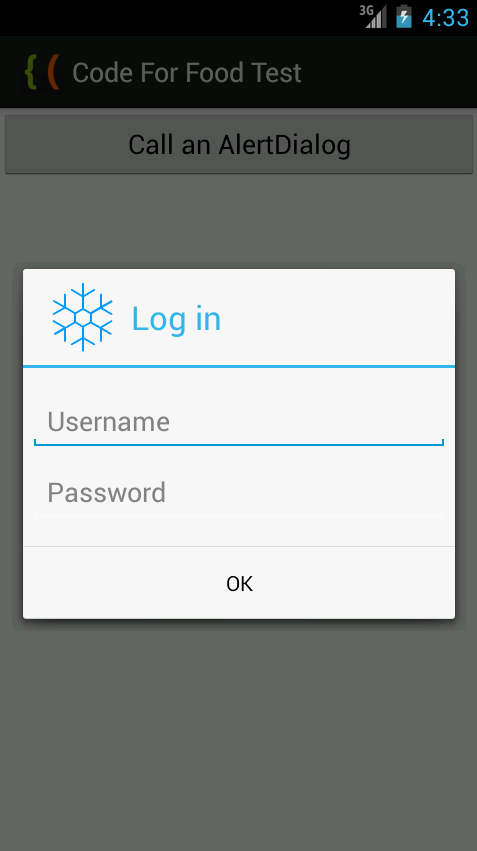
You can still use AlertDialogs elements made with the builder though! Ill add a title, an icon and a button to this layout using the builder.
In the onClick() event handler function of the button, I extract the text values of the two EditText objects and display them in a Toast:
Full code:
The resulting application looks something like this:
Thanks for reading!
Read more »
Firstly, create the layout xml. I called mine custom_alert_layout.xml. It is a simple LinearLayout container with 2 EditTexts in it - with ids username and password. They are also stylized to look and behave like username and password fields in a log in window.
<?xml version="1.0" encoding="utf-8"?>
<LinearLayout xmlns:android="http://schemas.android.com/apk/res/android"
    android:orientation="vertical"
    android:layout_width="wrap_content"
    android:layout_height="wrap_content">
    <EditText
        android:id="@+id/username"
        android:inputType="textEmailAddress"
        android:layout_width="match_parent"
        android:layout_height="wrap_content"
        android:layout_marginTop="16dp"
        android:layout_marginLeft="4dp"
        android:layout_marginRight="4dp"
        android:layout_marginBottom="4dp"
        android:hint="Username" />
    <EditText
        android:id="@+id/password"
        android:inputType="textPassword"
        android:layout_width="match_parent"
        android:layout_height="wrap_content"
        android:layout_marginTop="4dp"
        android:layout_marginLeft="4dp"
        android:layout_marginRight="4dp"
        android:layout_marginBottom="16dp"
        android:fontFamily="sans-serif"
        android:hint="Password"/>
</LinearLayout>
Now go to MainActivity.java class. First we declare a View:
private View alertView;
Then in onCreate() function we can use a LayoutInflater to get a View out of the xml layout. Apply this View value to alertView:
LayoutInflater inflater = LayoutInflater.from(getApplicationContext());
alertView = inflater.inflate(R.layout.custom_alert_layout, null);
You can apply this view to the AlertDialog using the builders setView() method:
builder.setView(alertView);
You can still use AlertDialogs elements made with the builder though! Ill add a title, an icon and a button to this layout using the builder.
In the onClick() event handler function of the button, I extract the text values of the two EditText objects and display them in a Toast:
@Override
public void onClick(DialogInterface dialog, int which) {
EditText t_user = (EditText)alertView.findViewById(R.id.username);
EditText t_pass = (EditText)alertView.findViewById(R.id.password);
String username = t_user.getText().toString();
String password = t_pass.getText().toString();
Toast toast = Toast.makeText(getApplicationContext(), "User: " + username + ", Pass: " + password, Toast.LENGTH_SHORT);
toast.show();
}
Full code:
package com.kircode.codeforfood_test;

import android.app.Activity;
import android.app.AlertDialog;
import android.content.DialogInterface;
import android.os.Bundle;
import android.view.LayoutInflater;
import android.view.Menu;
import android.view.View;
import android.widget.Button;
import android.widget.EditText;
import android.widget.Toast;

public class MainActivity extends Activity{

private AlertDialog myDialog;
private View alertView;

@Override
protected void onCreate(Bundle savedInstanceState) {
super.onCreate(savedInstanceState);
setContentView(R.layout.activity_main);

Button button = (Button)findViewById(R.id.testButton);

AlertDialog.Builder builder = new AlertDialog.Builder(MainActivity.this);

LayoutInflater inflater = LayoutInflater.from(getApplicationContext());
alertView = inflater.inflate(R.layout.custom_alert_layout, null);
builder.setView(alertView);

builder.setTitle("Log in");
builder.setIcon(R.drawable.snowflake);

builder.setPositiveButton("OK", new DialogInterface.OnClickListener() {

@Override
public void onClick(DialogInterface dialog, int which) {
EditText t_user = (EditText)alertView.findViewById(R.id.username);
EditText t_pass = (EditText)alertView.findViewById(R.id.password);
String username = t_user.getText().toString();
String password = t_pass.getText().toString();
Toast toast = Toast.makeText(getApplicationContext(), "User: " + username + ", Pass: " + password, Toast.LENGTH_SHORT);
toast.show();
}
});

builder.setCancelable(false);
myDialog = builder.create();

button.setOnClickListener(new View.OnClickListener() {

@Override
public void onClick(View v) {
myDialog.show();
}
});
}

@Override
public boolean onCreateOptionsMenu(Menu menu) {
// Inflate the menu; this adds items to the action bar if it is present.
getMenuInflater().inflate(R.menu.activity_main, menu);
return true;
}

}
The resulting application looks something like this:
Thanks for reading!

Android beginner tutorial Part 12 EditText component
Today well learn about the EditText widget.
The EditText component is used to allow the user enter text. EditText is a class that extends TextView, but instead of just displaying the text, it displays it in a text field with a slight border and lets the user edit the text by tapping on the field.
The main class of the EditText class is getText(). It returns the text that is currently the value of this text field, but the type of the returned value is Editable, not String. The difference is that the Editable type is a text interface, which has variable text (based on the changes in the text field), as opposed to String, which is just a piece of text that doesnt change.
Theres also a method called setHint(), which displays a tip that is supposed to give the user an idea of what the text fields purpose is. Its value can be set to, for example, "Enter text here..." or "Your message..." The user sees it as the value of the textfield before he taps on it. Then it gets changed to whatever text he enters.
There are also a few methods in the class for managing text selection, such as selectAll(), setSelection(int start, int stop), setSelection(int index). The difference between the two setSelection() methods is that the first way to use it is to specify the beginning and ending indices of the selection, while the other way to use it is to just provide 1 value which sets the cursor to a specific index position.
Lets create a simple example in our activity_main.xml layout in our Android project.
Heres the code:
The strings.xml code:
The results:
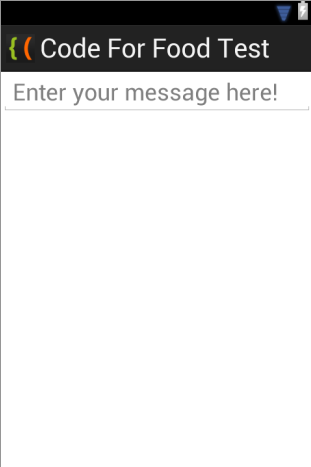
If you test your application now, youll see that after tapping on the text field, a keyboard UI pops up just like it usually does when entering text using the device.
Thats all for today.
Thanks for reading!
Read more »
The EditText component is used to allow the user enter text. EditText is a class that extends TextView, but instead of just displaying the text, it displays it in a text field with a slight border and lets the user edit the text by tapping on the field.
The main class of the EditText class is getText(). It returns the text that is currently the value of this text field, but the type of the returned value is Editable, not String. The difference is that the Editable type is a text interface, which has variable text (based on the changes in the text field), as opposed to String, which is just a piece of text that doesnt change.
Theres also a method called setHint(), which displays a tip that is supposed to give the user an idea of what the text fields purpose is. Its value can be set to, for example, "Enter text here..." or "Your message..." The user sees it as the value of the textfield before he taps on it. Then it gets changed to whatever text he enters.
There are also a few methods in the class for managing text selection, such as selectAll(), setSelection(int start, int stop), setSelection(int index). The difference between the two setSelection() methods is that the first way to use it is to specify the beginning and ending indices of the selection, while the other way to use it is to just provide 1 value which sets the cursor to a specific index position.
Lets create a simple example in our activity_main.xml layout in our Android project.
Heres the code:
<LinearLayout xmlns:android="http://schemas.android.com/apk/res/android"
    xmlns:tools="http://schemas.android.com/tools"
    android:layout_width="match_parent"
    android:layout_height="match_parent"
    android:orientation="vertical"
    tools:context=".MainActivity" >

    <EditText
        android:layout_width="match_parent"
        android:layout_height="wrap_content"
        android:hint="@string/textHint"
        android:textSize="24sp"/>

</LinearLayout>
The strings.xml code:
<?xml version="1.0" encoding="utf-8"?>
<resources>

    <string name="app_name">Code For Food Test</string>
    <string name="textHint">Enter your message here!</string>
    <string name="menu_settings">Settings</string>

</resources>
The results:
If you test your application now, youll see that after tapping on the text field, a keyboard UI pops up just like it usually does when entering text using the device.
Thats all for today.
Thanks for reading!
Tuesday, February 3, 2015
KirSQLite Flex AIR Database Manager Part 7
In this part of the tutorial we will add the ability to view columns of a table by selecting a table in the tree container and also add a check that doesnt let the user create a new database file on top of another one, overwriting it.
To prevent overwriting, add an if statement to the newDatabase() function, that checks if the file already exists:
The columns will be displayed in the tableGrid AdvancedDataGrid object. As you may already know, to assign column values to an AdvancedDataGrid, you have to create an array and apply it to the "columns" property of the data grid object.
Find the AdvancedDataGrid in the existing code and set its columns property to an array of one single AdvancedDataGridColumn object, which has the header "Data". Thats what will be displayed by default.
We had a column that was supposed to contain checkboxes for each item, so that the user can select multiple items to perform an action with them. The column is not lost, just move it to the Declarations tags and give it an id of "checkboxColumn", well use it soon.
Now go to the loadDataSchema() function. Here well add 2 more attributes to each table element in the XML. The attributes are isBranch and databaseName. Set their values as shown:
Now find the Tree object. Add an "itemClick" event listener and set its handler to tableSelect(event):
The function first checks if the selected item is not a branch. If it isnt, then its a table. Create a new array with just one value in the beginning (checkboxColumn), and then use connections loadSchema() object to load data of the table. Set values to the first 3 parameters of the function as shown below.
After that is done, we can use the schemas data to loop through the tables columns and add them one by one to the array. Then we just apply the array to tableGrid.columns:
Full code:
Thanks for reading!
Read more »
To prevent overwriting, add an if statement to the newDatabase() function, that checks if the file already exists:
private function newDatabase():void {
var file:File = File.desktopDirectory.resolvePath("Untitled");
file.addEventListener(Event.SELECT, newSelect);
file.browseForSave("Choose where to save the database");
var newDB:XML;
var statement:SQLStatement = new SQLStatement();
function newSelect(evt:Event):void {
if (file.exists) {
Alert.show("File already exists, cannot overwrite.", "Nope");
return;
}
file.nativePath += ".db";
var n:String = parseDatabase(file);
loadDataSchema(n);
}
}
The columns will be displayed in the tableGrid AdvancedDataGrid object. As you may already know, to assign column values to an AdvancedDataGrid, you have to create an array and apply it to the "columns" property of the data grid object.
Find the AdvancedDataGrid in the existing code and set its columns property to an array of one single AdvancedDataGridColumn object, which has the header "Data". Thats what will be displayed by default.
<mx:AdvancedDataGrid id="tableGrid" width="100%" height="100%" dataProvider="{tableData}" editable="true">
<mx:columns>
<mx:AdvancedDataGridColumn dataField="" headerText="Data" editable="false" />
</mx:columns>
</mx:AdvancedDataGrid>
We had a column that was supposed to contain checkboxes for each item, so that the user can select multiple items to perform an action with them. The column is not lost, just move it to the Declarations tags and give it an id of "checkboxColumn", well use it soon.
<mx:AdvancedDataGridColumn id="checkboxColumn" headerText=" " width="30" sortable="false" draggable="false" resizable="false" editable="false">
<mx:itemRenderer>
<fx:Component>
<mx:Box width="30" horizontalAlign="center">
<mx:CheckBox selected="@{data.sel}" />
</mx:Box>
</fx:Component>
</mx:itemRenderer>
</mx:AdvancedDataGridColumn>
Now go to the loadDataSchema() function. Here well add 2 more attributes to each table element in the XML. The attributes are isBranch and databaseName. Set their values as shown:
private function loadDataSchema(name:String):void {
if (name != "") {
connection.loadSchema(null, null, name, true, new Responder(schemaSuccess, schemaError));
function schemaSuccess(evt:SQLSchemaResult):void {
// Schema found! Now parsing:
var result:SQLSchemaResult = evt;
// Adding tables:
var nid:Number = (name=="main")?(1):(Number(name.replace("db", "")));
var dataNode:XMLList = dbData.db.(@numid == nid);
dataNode.setChildren(<placeholder/>);
delete dataNode.placeholder;
for (var i:int = 0; i < result.tables.length; i++) {
var newTable:XML = new XML(<tb/>);
newTable.@label = result.tables[i].name;
newTable.@isBranch = false;
newTable.@databaseName = name;
dataNode.appendChild(newTable);
}
}
function schemaError(evt:SQLError):void {
// Alert.show("Database is empty");
}
}
}
Now find the Tree object. Add an "itemClick" event listener and set its handler to tableSelect(event):
<mx:Tree width="100%" height="100%" dataProvider="{dbData}" showRoot="false" labelField="@label" itemClick="tableSelect(event);" />
The function first checks if the selected item is not a branch. If it isnt, then its a table. Create a new array with just one value in the beginning (checkboxColumn), and then use connections loadSchema() object to load data of the table. Set values to the first 3 parameters of the function as shown below.
After that is done, we can use the schemas data to loop through the tables columns and add them one by one to the array. Then we just apply the array to tableGrid.columns:
private function tableSelect(evt:Event):void {
if (evt.currentTarget.selectedItem.@isBranch == false) {
var newColumns:Array = [checkboxColumn];
connection.loadSchema(SQLTableSchema, evt.currentTarget.selectedItem.@label, evt.currentTarget.selectedItem.@databaseName);
var schema:SQLSchemaResult = connection.getSchemaResult();
for (var i:int = 0; i < schema.tables[0].columns.length; i++) {
var aColumn:AdvancedDataGridColumn = new AdvancedDataGridColumn(schema.tables[0].columns[i].name);
newColumns.push(aColumn);
}
tableGrid.columns = newColumns;
}
}
Full code:
<?xml version="1.0" encoding="utf-8"?>
<s:WindowedApplication xmlns:fx="http://ns.adobe.com/mxml/2009"
                       xmlns:s="library://ns.adobe.com/flex/spark"
                       xmlns:mx="library://ns.adobe.com/flex/mx" showStatusBar="false">

<s:menu>
<mx:FlexNativeMenu dataProvider="{windowMenu}" showRoot="false" labelField="@label" keyEquivalentField="@key" itemClick="menuSelect(event);" />
</s:menu>

<fx:Declarations>
<fx:XML id="windowMenu">
<root>
<menuitem label="Database">
<menuitem id="newdb" label="New" key="n" controlKey="true" />
<menuitem id="opendb" label="Open" key="o" controlKey="true" />
<menuitem label="Save" key="s" controlKey="true" />
<menuitem label="Save As.." key="s" controlKey="true" shiftKey="true" />
</menuitem>
<menuitem label="Table">
<menuitem label="Add" key="t" controlKey="true" />
<menuitem label="Edit" key="e" controlKey="true" />
<menuitem label="Delete"/>
</menuitem>
</root>
</fx:XML>
<fx:XMLList id="dbData">
</fx:XMLList>
<mx:ArrayCollection id="tableData">
</mx:ArrayCollection>
<mx:AdvancedDataGridColumn id="checkboxColumn" headerText=" " width="30" sortable="false" draggable="false" resizable="false" editable="false">
<mx:itemRenderer>
<fx:Component>
<mx:Box width="30" horizontalAlign="center">
<mx:CheckBox selected="@{data.sel}" />
</mx:Box>
</fx:Component>
</mx:itemRenderer>
</mx:AdvancedDataGridColumn>
</fx:Declarations>

<fx:Script>
<![CDATA[
import flash.data.SQLConnection;
import flash.data.SQLResult;
import flash.data.SQLSchema;
import flash.data.SQLSchemaResult;
import flash.data.SQLStatement;
import flash.errors.SQLError;
import flash.events.Event;
import flash.events.SQLEvent;
import flash.filesystem.File;
import flash.net.FileFilter;
import flash.net.Responder;
import mx.controls.advancedDataGridClasses.AdvancedDataGridColumn;
import mx.controls.Alert;
import mx.events.FlexNativeMenuEvent;

private var connection:SQLConnection = new SQLConnection();

private function selectAllChange(evt:Event):void {
var i:int;
if (evt.currentTarget.selected) {
for (i = 0; i < tableData.length; i++) {
tableData[i].sel = true;
}
} else
if (!evt.currentTarget.selected) {
for (i = 0; i < tableData.length; i++) {
tableData[i].sel = false;
}
}
tableGrid.invalidateDisplayList();
tableGrid.invalidateList();
}

private function menuSelect(evt:FlexNativeMenuEvent):void {
(evt.item.@id == "newdb")?(newDatabase()):(void);
(evt.item.@id == "opendb")?(openDatabase()):(void);
}

private function newDatabase():void {
var file:File = File.desktopDirectory.resolvePath("Untitled");
file.addEventListener(Event.SELECT, newSelect);
file.browseForSave("Choose where to save the database");
var newDB:XML;
var statement:SQLStatement = new SQLStatement();
function newSelect(evt:Event):void {
if (file.exists) {
Alert.show("File already exists, cannot overwrite.", "Nope");
return;
}
file.nativePath += ".db";
var n:String = parseDatabase(file);
loadDataSchema(n);
}
}

private function openDatabase():void {
var file:File = new File();
file.browseForOpen("Open database", [new FileFilter("Databases", "*.db"), new FileFilter("All files", "*")]);
file.addEventListener(Event.SELECT, openSelect);

function openSelect(evt:Event):void {
var n:String = parseDatabase(file, true);
loadDataSchema(n);
}
}

private function loadDataSchema(name:String):void {
if (name != "") {
connection.loadSchema(null, null, name, true, new Responder(schemaSuccess, schemaError));
function schemaSuccess(evt:SQLSchemaResult):void {
// Schema found! Now parsing:
var result:SQLSchemaResult = evt;
// Adding tables:
var nid:Number = (name=="main")?(1):(Number(name.replace("db", "")));
var dataNode:XMLList = dbData.db.(@numid == nid);
dataNode.setChildren(<placeholder/>);
delete dataNode.placeholder;
for (var i:int = 0; i < result.tables.length; i++) {
var newTable:XML = new XML(<tb/>);
newTable.@label = result.tables[i].name;
newTable.@isBranch = false;
newTable.@databaseName = name;
dataNode.appendChild(newTable);
}
}
function schemaError(evt:SQLError):void {
// Alert.show("Database is empty");
}
}
}

private function parseDatabase(file:File, needCheck:Boolean = false):String {
var ret:String = "";
if (!needCheck || file.exists) {
if(!needCheck || notAlreadyOpen(file)){
var newDB:XML;
if (dbData.db.length() == 0) {
connection.open(file);
dbData = new XMLList(<root></root>);
newDB = <db/>
newDB.@label = file.name;
newDB.@numid = 1;
newDB.@isBranch = true;
newDB.@path = file.nativePath;
dbData[0].appendChild(newDB);
ret = "main";
}else
if (dbData.db.length() > 0) {
var newnum:int = dbData.db.length() + 1;
connection.attach("db"+newnum.toString(), file);
newDB = <db/>
newDB.@label = file.name;
newDB.@numid = newnum.toString();
newDB.@isBranch = true;
newDB.@path = file.nativePath;
dbData[0].appendChild(newDB);
ret = "db" + newnum.toString();
}}else {
Alert.show("Database already opened.", "Error");
}
}else {
Alert.show("File not found.", "Error");
}
return ret;
}

private function notAlreadyOpen(file:File):Boolean{
var r:Boolean = true;
for (var i:int = 0; i < dbData.db.length(); i++) {
if (file.nativePath == dbData.db[i].@path) {
r = false;
}
}
return r;
}

private function tableSelect(evt:Event):void {
if (evt.currentTarget.selectedItem.@isBranch == false) {
var newColumns:Array = [checkboxColumn];
connection.loadSchema(SQLTableSchema, evt.currentTarget.selectedItem.@label, evt.currentTarget.selectedItem.@databaseName);
var schema:SQLSchemaResult = connection.getSchemaResult();
for (var i:int = 0; i < schema.tables[0].columns.length; i++) {
var aColumn:AdvancedDataGridColumn = new AdvancedDataGridColumn(schema.tables[0].columns[i].name);
newColumns.push(aColumn);
}
tableGrid.columns = newColumns;
}
}
]]>
</fx:Script>

<s:HGroup gap="0" width="100%" height="100%">
<s:VGroup width="200" height="100%" gap="0">
<mx:Tree width="100%" height="100%" dataProvider="{dbData}" showRoot="false" labelField="@label" itemClick="tableSelect(event);" />
</s:VGroup>
<s:VGroup width="100%" height="100%" gap="0">
<mx:TabNavigator width="100%" height="100%" paddingTop="0">
<s:NavigatorContent label="Table contents">
<s:VGroup width="100%" height="100%" gap="0">
<mx:HBox width="100%" height="30" paddingLeft="8" paddingTop="6">
<mx:CheckBox label="Select all" change="selectAllChange(event);" />
<s:Button label="Delete selected"/>
</mx:HBox>
<mx:AdvancedDataGrid id="tableGrid" width="100%" height="100%" dataProvider="{tableData}" editable="true">
<mx:columns>
<mx:AdvancedDataGridColumn dataField="" headerText="Data" editable="false" />
</mx:columns>
</mx:AdvancedDataGrid>
</s:VGroup>
</s:NavigatorContent>
<s:NavigatorContent label="Edit columns">

</s:NavigatorContent>
<s:NavigatorContent label="Query">

</s:NavigatorContent>
</mx:TabNavigator>
</s:VGroup>
</s:HGroup>

</s:WindowedApplication>
Thanks for reading!
Sunday, February 1, 2015
KirSQLite Flex AIR Database Manager Part 27
In this tutorial were adding a "Rename table" feature to our application.
The "Rename" button will be located next to the "New" and "Drop" buttons, right over the List object. Set this buttons click event handler to renameTable(), and enabled property bound to isTableSelected:
Now go to the Declarations tags and create a new TitleWindow there. Set its id to renameTableWindow, close event handler to closeRenameTableWindow() and showCloseButton to true. Inside the container, add a TextInput with an id renameTableName, with a button, with click event handler set to doRenameTable():
Now create the renameTable() function. Inside of it, add and center the popup we just created. Set the TextFields text value to the current name:
Create the close function:
And now the doRenameTable() function. Here well create an SQLStatement object, use an ALTER TABLE SQL query to rename the table.
Add a responder to be able to listen to success and error. On success, close the window and set the tables name in the XML to the updated one. On error, display the error:
Full code:
Thanks for reading!
Read more »
The "Rename" button will be located next to the "New" and "Drop" buttons, right over the List object. Set this buttons click event handler to renameTable(), and enabled property bound to isTableSelected:
<s:HGroup width="200">
<s:Button label="New" click="newTable();" toolTip="New table" width="50" enabled="{tableTree.selectedItems.length>0}"/>
<s:Button label="Drop" click="dropTable();" toolTip="Drop table" width="60" enabled="{isTableSelected}" />
<s:Button label="Rename" click="renameTable();" toolTip="Rename table" width="70" enabled="{isTableSelected}" />
</s:HGroup>
Now go to the Declarations tags and create a new TitleWindow there. Set its id to renameTableWindow, close event handler to closeRenameTableWindow() and showCloseButton to true. Inside the container, add a TextInput with an id renameTableName, with a button, with click event handler set to doRenameTable():
<mx:TitleWindow id="renameTableWindow" title="Rename table" close="closeRenameTableWindow();" showCloseButton="true">
<s:VGroup>
<s:HGroup width="100%" verticalAlign="middle">
<s:Label>Table name: </s:Label>
<s:TextInput id="renameTableName" />
</s:HGroup>
<s:Button click="doRenameTable();" label="Rename" width="100%" />
</s:VGroup>
</mx:TitleWindow>
Now create the renameTable() function. Inside of it, add and center the popup we just created. Set the TextFields text value to the current name:
private function renameTable():void {
PopUpManager.addPopUp(renameTableWindow, this);
PopUpManager.centerPopUp(renameTableWindow);
renameTableName.text = tableTree.selectedItem.@label;
}
Create the close function:
private function closeRenameTableWindow():void {
PopUpManager.removePopUp(renameTableWindow);
}
And now the doRenameTable() function. Here well create an SQLStatement object, use an ALTER TABLE SQL query to rename the table.
Add a responder to be able to listen to success and error. On success, close the window and set the tables name in the XML to the updated one. On error, display the error:
private function doRenameTable():void {
var stat:SQLStatement = new SQLStatement();
stat.sqlConnection = connection;
stat.text = "ALTER TABLE " + selectedDatabase + "." + tableTree.selectedItem.@label + " RENAME TO " + renameTableName.text;
lastStatement(stat.text);
stat.execute( -1, new Responder(renameSuccess, renameError));
function renameSuccess(evt:SQLResult):void {
closeRenameTableWindow();
tableTree.selectedItem.@label = renameTableName.text;
}
function renameError(evt:SQLError):void {
Alert.show("ERROR: " + evt.details, "Error");
}
}
Full code:
<?xml version="1.0" encoding="utf-8"?>
<s:WindowedApplication xmlns:fx="http://ns.adobe.com/mxml/2009"
                       xmlns:s="library://ns.adobe.com/flex/spark"
                       xmlns:mx="library://ns.adobe.com/flex/mx" showStatusBar="false">

<s:menu>
<mx:FlexNativeMenu dataProvider="{windowMenu}" showRoot="false" labelField="@label" keyEquivalentField="@key" itemClick="menuSelect(event);" />
</s:menu>

<fx:Declarations>
<fx:XML id="windowMenu">
<root>
<menuitem label="Database">
<menuitem id="newdb" label="New" key="n" controlKey="true" />
<menuitem id="opendb" label="Open" key="o" controlKey="true" />
<menuitem id="savedb" label="Save a copy" key="s" controlKey="true" enabled="{tableTree.selectedItems.length>0}"/>
</menuitem>
<menuitem label="Table">
<menuitem id="newtable" label="Add table" key="t" controlKey="true" enabled="{tableTree.selectedItems.length>0}"/>
<menuitem id="droptable" label="Drop table" key="d" controlKey="true" enabled="{isTableSelected}"/>
</menuitem>
</root>
</fx:XML>
<fx:XMLList id="dbData">
</fx:XMLList>
<mx:ArrayCollection id="tableData">
</mx:ArrayCollection>
<mx:ArrayCollection id="columnData">
</mx:ArrayCollection>
<mx:ArrayCollection id="conflictTypes">
<fx:String>---</fx:String>
<fx:String>ABORT</fx:String>
<fx:String>FAIL</fx:String>
<fx:String>IGNORE</fx:String>
<fx:String>ROLLBACK</fx:String>
<fx:String>REPLACE</fx:String>
</mx:ArrayCollection>
<mx:ArrayCollection id="dataTypes">
<fx:String>NONE</fx:String>
<fx:String>INTEGER</fx:String>
<fx:String>TEXT</fx:String>
<fx:String>REAL</fx:String>
<fx:String>NUMERIC</fx:String>
</mx:ArrayCollection>
<mx:AdvancedDataGridColumn id="checkboxColumn" headerText=" " width="30" sortable="false" draggable="false" resizable="false" editable="false">
<mx:itemRenderer>
<fx:Component>
<mx:Box width="30" horizontalAlign="center">
<mx:CheckBox selected="@{data.sel}" />
</mx:Box>
</fx:Component>
</mx:itemRenderer>
</mx:AdvancedDataGridColumn>
<mx:TitleWindow id="newTableWindow" title="Create new table" close="closeNewTableWindow();" showCloseButton="true">
<s:VGroup>
<s:HGroup width="100%" verticalAlign="middle">
<s:Label>Table name: </s:Label>
<s:TextInput id="newTableName" />
</s:HGroup>
<s:HGroup width="100%" verticalAlign="middle">
<s:Label>Key column: </s:Label>
<s:TextInput id="keyName" />
</s:HGroup>
<s:Button click="createNewTable();" label="Create" width="100%" />
</s:VGroup>
</mx:TitleWindow>
<mx:TitleWindow id="newRecordWindow" title="Add new record" close="closeNewRecordWindow();" showCloseButton="true">
<s:VGroup width="100%" height="100%">
<mx:AdvancedDataGrid id="recordDataGrid" width="100%" height="50" editable="true"/>
<s:Button click="addNewRecord();" label="Add record" width="100%"/>
</s:VGroup>
</mx:TitleWindow>
<mx:TitleWindow id="historyWindow" title="SQL History" close="closeHistoryWindow();" showCloseButton="true">
<mx:Box width="100%" height="100%" paddingLeft="10" paddingRight="10" paddingTop="10" paddingBottom="10">
<s:TextArea id="historyText" width="100%" height="100%" editable="false" />
</mx:Box>
</mx:TitleWindow>
<mx:TitleWindow id="renameTableWindow" title="Rename table" close="closeRenameTableWindow();" showCloseButton="true">
<s:VGroup>
<s:HGroup width="100%" verticalAlign="middle">
<s:Label>Table name: </s:Label>
<s:TextInput id="renameTableName" />
</s:HGroup>
<s:Button click="doRenameTable();" label="Rename" width="100%" />
</s:VGroup>
</mx:TitleWindow>
</fx:Declarations>

<fx:Script>
<![CDATA[
import flash.data.SQLConnection;
import flash.data.SQLResult;
import flash.data.SQLSchema;
import flash.data.SQLSchemaResult;
import flash.data.SQLStatement;
import flash.errors.SQLError;
import flash.events.Event;
import flash.events.MouseEvent;
import flash.events.SQLEvent;
import flash.filesystem.File;
import flash.net.FileFilter;
import flash.net.FileReference;
import flash.net.Responder;
import flash.ui.ContextMenu;
import flash.ui.ContextMenuItem;
import mx.collections.ArrayCollection;
import mx.controls.advancedDataGridClasses.AdvancedDataGridColumn;
import mx.controls.Alert;
import mx.events.CloseEvent;
import mx.events.FlexNativeMenuEvent;
import mx.managers.PopUpManager;

private var connection:SQLConnection = new SQLConnection();
private var selectedDatabase:String = "";
[Bindable]
private var isTableSelected:Boolean = false;
private var sqlHistory:Array = [];
private var recordColumnNames:Array = [];
private var recordColumnNamesFull:Array = [];

private function selectAllChange(evt:Event):void {
var i:int;
if (evt.currentTarget.selected) {
for (i = 0; i < tableData.length; i++) {
tableData[i].sel = true;
}
} else
if (!evt.currentTarget.selected) {
for (i = 0; i < tableData.length; i++) {
tableData[i].sel = false;
}
}
tableGrid.invalidateDisplayList();
tableGrid.invalidateList();
}

private function menuSelect(evt:FlexNativeMenuEvent):void {
(evt.item.@id == "newdb")?(newDatabase()):(void);
(evt.item.@id == "opendb")?(openDatabase()):(void);
(evt.item.@id == "newtable")?(newTable()):(void);
(evt.item.@id == "droptable")?(dropTable()):(void);
(evt.item.@id == "savedb")?(saveCopy()):(void);
}

private function newDatabase():void {
var file:File = File.desktopDirectory.resolvePath("Untitled");
file.addEventListener(Event.SELECT, newSelect);
file.browseForSave("Choose where to save the database");
var newDB:XML;
var statement:SQLStatement = new SQLStatement();
function newSelect(evt:Event):void {
if (file.exists) {
Alert.show("File already exists, cannot overwrite.", "Nope");
return;
}
file.nativePath += ".db";
var n:String = parseDatabase(file);
loadDataSchema(n);
}
}

private function openDatabase():void {
var file:File = new File();
file.browseForOpen("Open database", [new FileFilter("Databases", "*.db"), new FileFilter("All files", "*")]);
file.addEventListener(Event.SELECT, openSelect);

function openSelect(evt:Event):void {
var n:String = parseDatabase(file, true);
loadDataSchema(n);
}
}

private function saveCopy():void {
var databasePath:String;
if (selectedDatabase == "main") databasePath = dbData.db[0].@path;
if (selectedDatabase != "main") {
var newNum:int = Number(selectedDatabase.replace("db", ""));
var newInd:int;
for (var i:int = 0; i < dbData.db.length(); i++) {
if (dbData.db[i].@numid == newNum) {
newInd = i;
break;
}
}
databasePath = dbData.db[newInd].@path;
}
var file:File = new File(databasePath);
file.browseForSave("Save copy of database");
file.addEventListener(Event.SELECT, onCopySelect);
function onCopySelect(evt:Event):void {
if(notAlreadyOpen(file)){
var initFile:File = new File(databasePath);
initFile.copyTo(file, true);
}else {
Alert.show("Cannot overwrite a file that is currently open.", "Nope");
}
}
}

private function loadDataSchema(name:String):void {
if (name != "") {
connection.loadSchema(null, null, name, true, new Responder(schemaSuccess, schemaError));
function schemaSuccess(evt:SQLSchemaResult):void {
// Schema found! Now parsing:
var result:SQLSchemaResult = evt;
// Adding tables:
var nid:Number = (name=="main")?(1):(Number(name.replace("db", "")));
var dataNode:XMLList = dbData.db.(@numid == nid);
dataNode.setChildren(<placeholder/>);
delete dataNode.placeholder;
for (var i:int = 0; i < result.tables.length; i++) {
var newTable:XML = new XML(<tb/>);
newTable.@label = result.tables[i].name;
newTable.@isBranch = false;
newTable.@databaseName = name;
dataNode.appendChild(newTable);
}
}
function schemaError(evt:SQLError):void {
// Alert.show("Database is empty");
}
isTableSelected = false;
}
}

private function parseDatabase(file:File, needCheck:Boolean = false):String {
var ret:String = "";
if (!needCheck || file.exists) {
if(!needCheck || notAlreadyOpen(file)){
var newDB:XML;
if (dbData.db.length() == 0) {
connection.open(file);
dbData = new XMLList(<root></root>);
newDB = <db/>
newDB.@label = file.name;
newDB.@numid = 1;
newDB.@isBranch = true;
newDB.@path = file.nativePath;
dbData[0].appendChild(newDB);
ret = "main";
}else
if (dbData.db.length() > 0) {
var newnum:int = dbData.db.length() + 1;
connection.attach("db"+newnum.toString(), file);
newDB = <db/>
newDB.@label = file.name;
newDB.@numid = newnum.toString();
newDB.@isBranch = true;
newDB.@path = file.nativePath;
dbData[0].appendChild(newDB);
ret = "db" + newnum.toString();
}}else {
Alert.show("Database already opened.", "Error");
}
}else {
Alert.show("File not found.", "Error");
}
return ret;
}

private function notAlreadyOpen(file:File):Boolean{
var r:Boolean = true;
for (var i:int = 0; i < dbData.db.length(); i++) {
if (file.nativePath == dbData.db[i].@path) {
r = false;
}
}
return r;
}

private function tableSelect():void {
saveTableButton.emphasized = false;
columnData = new ArrayCollection([]);
if(col_name!=null){
col_name.text = "";
col_data.selectedIndex = 0;
col_key.selected = false;
col_auto.selected = false;
col_unique.selected = false;
col_null.selected = false;
col_default.text = "";
col_conflict.selectedIndex = 0;
}
if (tableTree.selectedItem.@isBranch) {
isTableSelected = false;
var dataname:String;
if (tableTree.selectedItem.@numid == 1) dataname = "main";
if (tableTree.selectedItem.@numid > 1) dataname = "db" + tableTree.selectedItem.@numid;
selectedDatabase = dataname;
}
if (tableTree.selectedItem.@isBranch == false) {
isTableSelected = true;
selectedDatabase = tableTree.selectedItem.@databaseName;
tableData = new ArrayCollection([]);
var newColumns:Array = [checkboxColumn];
connection.loadSchema(SQLTableSchema, tableTree.selectedItem.@label, tableTree.selectedItem.@databaseName);
var schema:SQLSchemaResult = connection.getSchemaResult();
for (var i:int = 0; i < schema.tables[0].columns.length; i++) {
columnData.addItem({name:schema.tables[0].columns[i].name});
var aColumn:AdvancedDataGridColumn = new AdvancedDataGridColumn();
aColumn.headerText = schema.tables[0].columns[i].name;
aColumn.dataField = "db_" + schema.tables[0].columns[i].name;
if (schema.tables[0].columns[i].autoIncrement) aColumn.editable = false;
if (schema.tables[0].columns[i].primaryKey) tableTree.selectedItem.@primaryKeyColumn = schema.tables[0].columns[i].name;
newColumns.push(aColumn);
}
tableGrid.columns = newColumns;
var stat:SQLStatement = new SQLStatement();
stat.sqlConnection = connection;
stat.text = "SELECT * FROM " + tableTree.selectedItem.@databaseName + "." + tableTree.selectedItem.@label;
stat.execute(-1, new Responder(tableSuccess, tableError));
}
function tableSuccess(evt:SQLResult):void {
if (evt.data != null) {
for (var item:Object in evt.data) {
var obj:Object = new Object();
for (var value:Object in evt.data[item]) {
obj["db_"+value] = evt.data[item][value];
}
tableData.addItem(obj);
}
}
}
function tableError(evt:SQLError):void {
Alert.show("Unable to read table data.", "Error");
}
}

private function newTable():void {
PopUpManager.addPopUp(newTableWindow, this);
PopUpManager.centerPopUp(newTableWindow);
newTableWindow.title = "Create new table";
focusManager.setFocus(newTableName);
}

private function dropTable():void {
Alert.show("Are you sure you want to completely delete this table?", "Drop table?", Alert.YES | Alert.NO, null, dropConfirm);
function dropConfirm(evt:CloseEvent):void {
if (evt.detail == Alert.YES) {
var stat:SQLStatement = new SQLStatement();
stat.sqlConnection = connection;
stat.text = "DROP TABLE " + selectedDatabase + "." + tableTree.selectedItem.@label;
lastStatement(stat.text);
stat.execute( -1, new Responder(dropTableSuccess, dropTableError));
}
}
function dropTableSuccess(evt:SQLResult):void {
loadDataSchema(selectedDatabase);
}
function dropTableError(evt:SQLError):void {
Alert.show("ERROR:" + evt.details, "Error");
}
}

private function closeNewTableWindow():void{
PopUpManager.removePopUp(newTableWindow);
}

private function createNewTable():void {
var stat:SQLStatement = new SQLStatement();
stat.sqlConnection = connection;
stat.text = "CREATE TABLE IF NOT EXISTS " + selectedDatabase + "." + newTableName.text + "(" + keyName.text + " INTEGER PRIMARY KEY AUTOINCREMENT NOT NULL)";
lastStatement(stat.text);
stat.execute( -1, new Responder(newTableSuccess, newTableError));
function newTableSuccess(evt:SQLResult):void {
closeNewTableWindow();
loadDataSchema(selectedDatabase);
}
function newTableError(evt:SQLError):void {
Alert.show("ERROR:" + evt.details, "Error");
}
}

private function lastStatement(text:String):void {
statementText.text = text;
sqlHistory.push(text);
}

private function openHistory():void {
PopUpManager.addPopUp(historyWindow, this);
historyWindow.width = width - 100;
historyWindow.height = height - 100;
PopUpManager.centerPopUp(historyWindow);
historyText.text = "";
for (var i:int = sqlHistory.length - 1; i >= 0; i--) {
historyText.appendText(sqlHistory[i] + "
");
}
}

private function closeHistoryWindow():void {
PopUpManager.removePopUp(historyWindow);
}

private function saveTable():void {
connection.begin();
var keyColumnName:String = tableTree.selectedItem.@primaryKeyColumn;
// clear all "sel" and store them in a temp array
var tempSel:Array = [];
for (var s:int = 0; s < tableData.length; s++) {
if (tableData[s].sel) {
tempSel.push(true);
tableData[s].sel = false;
}else
if (!tableData[s].sel) {
tempSel.push(false);
}
}
// update each row
for (var i:int = 0; i < tableData.length; i++) {
var stat:SQLStatement = new SQLStatement();
var sqlStat:String = "UPDATE " + selectedDatabase + "." + tableTree.selectedItem.@label + " SET";
// add each attribute as parameter
for (var attribute:String in tableData[i]) {
// if column is not our CheckBox column or the key column
if (attribute != "mx_internal_uid" && attribute!=keyColumnName && attribute!="sel") {
// add value as parameter
stat.parameters["@" + attribute.substr(3)] = tableData[i][attribute];
sqlStat += " " + attribute.substr(3) + "=@" + attribute.substr(3) + ",";
}
}
// remove the last comma
sqlStat = sqlStat.substr(0, sqlStat.length - 1);
sqlStat += " WHERE " + keyColumnName + "=" + tableData[i]["db_"+keyColumnName];
stat.sqlConnection = connection;
stat.text = sqlStat;
lastStatement(stat.text);
stat.execute( -1, new Responder(saveSuccess, saveError));
}

function saveSuccess(evt:SQLResult):void {
}

function saveError(evt:SQLError):void {
Alert.show("ERROR: " + evt.details, "Error");
}

tableSelect();
for (var t:int = 0; t < tableData.length; t++) {
if (tempSel[t]) tableData[t].sel=true;
}
tableGrid.invalidateDisplayList();
tableGrid.invalidateList();
connection.commit();
}

private function deleteSelected():void {
connection.begin();
var keyColumnName:String = tableTree.selectedItem.@primaryKeyColumn;
for (var i:int = 0; i < tableData.length; i++) {
if (tableData[i].sel) {
var stat:SQLStatement = new SQLStatement();
stat.sqlConnection = connection;
stat.text = "DELETE FROM " + selectedDatabase + "." + tableTree.selectedItem.@label + " WHERE " + keyColumnName + "=" + tableData[i]["db_" + keyColumnName];
lastStatement(stat.text);
stat.execute( -1, new Responder(deleteSuccess, deleteError));
}
}
tableSelect();
tableGrid.invalidateDisplayList();
tableGrid.invalidateList();

function deleteSuccess(evt:SQLResult):void {
}
function deleteError(evt:SQLError):void {
Alert.show("ERROR: " + evt.details, "Error");
}
connection.commit();
}

private function newRecord():void {
PopUpManager.addPopUp(newRecordWindow, this);
newRecordWindow.width = width - 100;
newRecordWindow.height = 120;
PopUpManager.centerPopUp(newRecordWindow);

var columns:Array = getSchemaColumns();

var defaultItem:Object = new Object();
recordColumnNames = [];
recordColumnNamesFull = [];

var recordColumns:Array = [];
for (var i:int = columns.length-1; i >= 0; i--) {
if (columns[i].indexOf(" AUTOINCREMENT") == -1) {
recordColumnNames.push(columnData[i].name);
recordColumnNamesFull.push(columns[i]);
var advColumn:AdvancedDataGridColumn = new AdvancedDataGridColumn(columns[i]);
recordColumns.push(advColumn);
// find DEFAULT and extract it
var defaultMatch:String = "";
var defaultPattern:RegExp = /((DEFAULT)s((".+")|([0-9]+)))/i;
if (columns[i].match(defaultPattern)) {
defaultMatch = columns[i].match(defaultPattern)[0];
// delete "DEFAULT" from the match
defaultMatch = defaultMatch.substr(8);
// if any quotes are found, remove the first and last symbols
if (defaultMatch.indexOf(") != -1) {
defaultMatch = defaultMatch.substring(1, defaultMatch.length - 1);
}
}
defaultItem[columns[i]] = defaultMatch;
}
if (columns[i].indexOf(" AUTOINCREMENT") != -1) {
columns.splice(i, 1);
}
}

// if no fields to edit, insert blank
if (columns.length == 0) {
var stat:SQLStatement = new SQLStatement();
stat.sqlConnection = connection;
stat.text = "INSERT INTO " + selectedDatabase + "." + tableTree.selectedItem.@label + " DEFAULT VALUES;";
lastStatement(stat.text);
stat.execute( -1, new Responder(newSuccess, newError));

function newSuccess(evt:SQLResult):void {
closeNewRecordWindow();
tableSelect();
tableGrid.invalidateDisplayList();
tableGrid.invalidateList();
}
function newError(evt:SQLError):void {
Alert.show("ERROR: " + evt.details, "Error");
}
return;
}

recordDataGrid.columns = recordColumns;
recordDataGrid.dataProvider = new ArrayCollection([defaultItem]);
}

private function closeNewRecordWindow():void {
PopUpManager.removePopUp(newRecordWindow);
}

private function addNewRecord():void {
// placeholder code that inserts empty row:
var stat:SQLStatement = new SQLStatement();
stat.sqlConnection = connection;
stat.text = "INSERT INTO " + selectedDatabase + "." + tableTree.selectedItem.@label + " (";
stat.text += String(recordColumnNames);
stat.text += ") VALUES (";
var values:Array = [];
for (var i:int = 0; i < recordColumnNames.length; i++) {
var val:String;
var dataValue:String = recordDataGrid.dataProvider[0][recordColumnNamesFull[i]];
if (isNaN(Number(dataValue))) val = " + dataValue + ";
if (!isNaN(Number(dataValue))) val = dataValue;
values.push(val);
}
stat.text += String(values);
stat.text += ");";
lastStatement(stat.text);
stat.execute( -1, new Responder(newSuccess, newError));

function newSuccess(evt:SQLResult):void {
closeNewRecordWindow();
tableSelect();
tableGrid.invalidateDisplayList();
tableGrid.invalidateList();
}
function newError(evt:SQLError):void {
Alert.show("ERROR: " + evt.details, "Error");
}
}

private function columnSelect():void {
var columns:Array = getSchemaColumns();
// get the currently selected column
var currentColumn:String = columns[columnList.selectedIndex];
// delete the name of the column from this text
var currentParameters:String = currentColumn.substr(currentColumn.indexOf(columnList.selectedItem.name) + columnList.selectedItem.name.length + 1);
// find DEFAULT and extract it
var defaultMatch:String = "";
var defaultPattern:RegExp = /((DEFAULT)s((".+")|([0-9]+)))/i;
if (currentParameters.match(defaultPattern)) {
defaultMatch = currentParameters.match(defaultPattern)[0];
// delete it from currentParameters
currentParameters = currentParameters.replace(defaultMatch, "");
// delete "DEFAULT" from the match
defaultMatch = defaultMatch.substr(8);
// if any quotes are found, remove the first and last symbols
if (defaultMatch.indexOf(") != -1) {
defaultMatch = defaultMatch.substring(1, defaultMatch.length - 1);
}
}
// find ON CONFLICT and extract it
var conflictMatch:String = "";
var conflictPattern:RegExp = /((ON CONFLICT)s(ABORT|FAIL|IGNORE|ROLLBACK|REPLACE))/i;
if (currentParameters.match(conflictPattern)) {
conflictMatch = currentParameters.match(conflictPattern)[0];
// delete it from currentParameters
currentParameters = currentParameters.replace(conflictMatch, "");
// delete "ON CONFLICT" from the match
conflictMatch = conflictMatch.substr(12);
}
// apply values
col_name.text = columnList.selectedItem.name;
col_key.selected = (currentParameters.toUpperCase().indexOf("PRIMARY KEY") != -1)?(true):(false);
col_auto.selected = (currentParameters.toUpperCase().indexOf("AUTOINCREMENT") != -1)?(true):(false);
col_unique.selected = (currentParameters.toUpperCase().lastIndexOf("UNIQUE") != -1)?(true):(false);
col_null.selected = (currentParameters.toUpperCase().indexOf("NOT NULL") != -1)?(false):(true);
col_default.text = defaultMatch;
col_conflict.selectedIndex = 0;
if (conflictMatch.toUpperCase() == "ABORT") col_conflict.selectedIndex = 1;
if (conflictMatch.toUpperCase() == "FAIL") col_conflict.selectedIndex = 2;
if (conflictMatch.toUpperCase() == "IGNORE") col_conflict.selectedIndex = 3;
if (conflictMatch.toUpperCase() == "ROLLBACK") col_conflict.selectedIndex = 4;
if (conflictMatch.toUpperCase() == "REPLACE") col_conflict.selectedIndex = 5;

// read data type
connection.loadSchema(SQLTableSchema, tableTree.selectedItem.@label, tableTree.selectedItem.@databaseName);
var schema:SQLSchemaResult = connection.getSchemaResult();
col_data.textInput.text = schema.tables[0].columns[columnList.selectedIndex].dataType;

// enable or disable ON CONFLICT
checkConflict();
// unhighlight "Update selected"
col_b_update.emphasized = false;
}

private function checkConflict():void {
if (col_key.selected || !col_null.selected || col_unique.selected) {
col_conflict.enabled = true;
}else {
col_conflict.enabled = false;
}
}

private function formChange():void {
checkConflict();
if (columnList.selectedItems.length > 0) {
col_b_update.emphasized = true;
}
}

private function addColumn():void {
col_b_update.emphasized = false;
var prevTableName:String = tableTree.selectedItem.@label;
if (col_name.text != "" && col_data.textInput.text != "" && (col_null.selected || col_default.text != "")) {
connection.loadSchema(SQLTableSchema, tableTree.selectedItem.@label, tableTree.selectedItem.@databaseName);
var schema:SQLSchemaResult = connection.getSchemaResult();
var fullSQL:String = schema.tables[0].sql;
// extract the text inside the ( )
fullSQL = fullSQL.substring( fullSQL.indexOf("(") + 1 , fullSQL.lastIndexOf(")") );
var sqlText:String = "CREATE TABLE " + selectedDatabase + "." + tableTree.selectedItem.@label + " (";
sqlText += fullSQL + ", ";
// add the new column
sqlText += col_name.text + " " + col_data.textInput.text + " ";
if (col_key.selected) sqlText += "PRIMARY KEY ";
if (col_key.selected && col_conflict.selectedIndex > 0) sqlText += "ON CONFLICT " + col_conflict.selectedLabel + " ";
if (col_key.selected && col_auto.selected) sqlText += "AUTOINCREMENT ";
if (!col_null.selected) sqlText += "NOT NULL ";
if (!col_null.selected && col_conflict.selectedIndex > 0) sqlText += "ON CONFLICT " + col_conflict.selectedLabel + " ";
if (col_unique.selected) sqlText += "UNIQUE ";
if (col_unique.selected && col_conflict.selectedIndex > 0) sqlText += "ON CONFLICT " + col_conflict.selectedLabel + " ";
if (col_default.text != "") {
sqlText += "DEFAULT ";
if (isNaN(Number(col_default.text))) sqlText += " + col_default.text + ";
if (!isNaN(Number(col_default.text))) sqlText += col_default.text;
}
sqlText += ");";
lastStatement(sqlText);

// Create backup
var backupName:String = "backup";
while (!tableIsUnique(backupName)) {
backupName += "0";
}
var bstat:SQLStatement = new SQLStatement();
bstat.sqlConnection = connection;
bstat.text = "CREATE TABLE " + selectedDatabase + "." + backupName + " (" + fullSQL + ");";
bstat.execute();

// Copy data to backup
var cstat:SQLStatement = new SQLStatement();
cstat.sqlConnection = connection;
cstat.text = "INSERT INTO " + selectedDatabase + "." + backupName + " SELECT * FROM " + selectedDatabase + "." + tableTree.selectedItem.@label;
cstat.execute();

// Delete initial table
var dstat:SQLStatement = new SQLStatement();
dstat.sqlConnection = connection;
dstat.text = "DROP TABLE " + selectedDatabase + "." + tableTree.selectedItem.@label;
dstat.execute();

// Create new table
var stat:SQLStatement = new SQLStatement();
stat.sqlConnection = connection;
stat.text = sqlText;
stat.execute( -1, new Responder(newColumnSuccess, newColumnError));
}else {
Alert.show("Please fill all the required fields!", "Error");
}
function newColumnSuccess(evt:SQLResult):void {
// Insert previous values
var istat:SQLStatement = new SQLStatement();
istat.sqlConnection = connection;
istat.text = "INSERT INTO " + selectedDatabase + "." + prevTableName + " (" + columnNames() + ") SELECT " + columnNames() + " FROM " + selectedDatabase + "." + backupName;
istat.execute( -1, new Responder(newColumnInsertSuccess, newColumnInsertError));
function newColumnInsertSuccess(evt:SQLResult):void {
// Delete backup
var bdstat:SQLStatement = new SQLStatement();
bdstat.sqlConnection = connection;
bdstat.text = "DROP TABLE " + selectedDatabase + "." + backupName;
bdstat.execute();
tableSelect();
}
function newColumnInsertError(evt:SQLError):void {
Alert.show("ERROR: " + evt.details + "

Restoring the database using backup...", "Error");
// Delete existing table
var destat:SQLStatement = new SQLStatement();
destat.sqlConnection = connection;
destat.text = "DROP TABLE " + selectedDatabase + "." + prevTableName;
destat.execute();
// Restore table using backup
var rstat:SQLStatement = new SQLStatement();
rstat.sqlConnection = connection;
rstat.text = "ALTER TABLE " + selectedDatabase + "." + backupName + " RENAME TO " + prevTableName;
rstat.execute();
tableSelect();
}
}
function newColumnError(evt:SQLError):void {
Alert.show("ERROR: " + evt.details + "

Restoring the database using backup...", "Error");
// Restore table
var rstat:SQLStatement = new SQLStatement();
rstat.sqlConnection = connection;
rstat.text = "ALTER TABLE " + selectedDatabase + "." + backupName + " RENAME TO " + prevTableName;
rstat.execute();
tableSelect();
}
}

private function deleteColumn():void {
col_b_update.emphasized = false;
var prevTableName:String = tableTree.selectedItem.@label;

var columns:Array = getSchemaColumns();
// get the currently selected index
var currentIndex:int = columnList.selectedIndex;

// Create backup
var backupName:String = "backup";
while (!tableIsUnique(backupName)) {
backupName += "0";
}
var bstat:SQLStatement = new SQLStatement();
bstat.sqlConnection = connection;
var sqlText:String = "CREATE TABLE " + selectedDatabase + "." + backupName + " (";
columns.splice(currentIndex, 1);
if (columns.length == 0) {
Alert.show("Cant make a table completely empty! Leave at least one column.", "Nope");
return;
}
sqlText += String(columns);
sqlText += ");";
bstat.text = sqlText;
lastStatement(sqlText);
bstat.execute();

// Copy data to backup
var cstat:SQLStatement = new SQLStatement();
cstat.sqlConnection = connection;
cstat.text = "INSERT INTO " + selectedDatabase + "." + backupName + " (" + columnNames(currentIndex) + ") SELECT " + columnNames(currentIndex) + " FROM " + selectedDatabase + "." + tableTree.selectedItem.@label;
cstat.execute();

// Drop existing table
var dstat:SQLStatement = new SQLStatement();
dstat.sqlConnection = connection;
dstat.text = "DROP TABLE " + selectedDatabase + "." + tableTree.selectedItem.@label;
dstat.execute();

// Rename backup table to initial name
var rstat:SQLStatement = new SQLStatement();
rstat.sqlConnection = connection;
rstat.text = "ALTER TABLE " + selectedDatabase + "." + backupName + " RENAME TO " + prevTableName
rstat.execute();
tableSelect();
}

private function updateColumn():void {
col_b_update.emphasized = false;
var prevTableName:String = tableTree.selectedItem.@label;

if (col_name.text != "" && col_data.textInput.text != "" && (col_null.selected || col_default.text != "")) {
var columns:Array = getSchemaColumns();
// get the currently selected index
var currentIndex:int = columnList.selectedIndex;

// Create backup
var backupName:String = "backup";
while (!tableIsUnique(backupName)) {
backupName += "0";
}
var bstat:SQLStatement = new SQLStatement();
bstat.sqlConnection = connection;

// Compose updated column info
var newColumn:String = col_name.text + " " + col_data.textInput.text + " ";
if (col_key.selected) newColumn += "PRIMARY KEY ";
if (col_key.selected && col_conflict.selectedIndex > 0) newColumn += "ON CONFLICT " + col_conflict.selectedLabel + " ";
if (col_key.selected && col_auto.selected) newColumn += "AUTOINCREMENT ";
if (!col_null.selected) newColumn += "NOT NULL ";
if (!col_null.selected && col_conflict.selectedIndex > 0) newColumn += "ON CONFLICT " + col_conflict.selectedLabel + " ";
if (col_unique.selected) newColumn += "UNIQUE ";
if (col_unique.selected && col_conflict.selectedIndex > 0) newColumn += "ON CONFLICT " + col_conflict.selectedLabel + " ";
if (col_default.text != "") {
newColumn += "DEFAULT ";
if (isNaN(Number(col_default.text))) newColumn += " + col_default.text + ";
if (!isNaN(Number(col_default.text))) newColumn += col_default.text;
}

columns[currentIndex] = newColumn;

// Compose the table creation query
var sqlText:String = "CREATE TABLE " + selectedDatabase + "." + backupName + " (";
sqlText += String(columns);
sqlText += ");";
bstat.text = sqlText;
lastStatement(sqlText);
bstat.execute( -1, new Responder(updateColumnSuccess, updateColumnError));

function updateColumnSuccess(evt:SQLResult):void {
// Copy data to backup
var cstat:SQLStatement = new SQLStatement();
cstat.sqlConnection = connection;
cstat.text = "INSERT INTO " + selectedDatabase + "." + backupName + " (" + columnNames(currentIndex) + ") SELECT " + columnNames(currentIndex) + " FROM " + selectedDatabase + "." + tableTree.selectedItem.@label;
cstat.execute(-1, new Responder(updateInsertColumnSuccess, updateInsertColumnError));

function updateInsertColumnSuccess(evt:SQLResult):void {
// Drop existing table
var dstat:SQLStatement = new SQLStatement();
dstat.sqlConnection = connection;
dstat.text = "DROP TABLE " + selectedDatabase + "." + tableTree.selectedItem.@label;
dstat.execute();

// Rename backup table to initial name
var rstat:SQLStatement = new SQLStatement();
rstat.sqlConnection = connection;
rstat.text = "ALTER TABLE " + selectedDatabase + "." + backupName + " RENAME TO " + prevTableName;
rstat.execute();
tableSelect();
}
function updateInsertColumnError(evt:SQLError):void {
// Delete backup
var bdstat:SQLStatement = new SQLStatement();
bdstat.sqlConnection = connection;
bdstat.text = "DROP TABLE " + selectedDatabase + "." + backupName;
bdstat.execute();
tableSelect();
Alert.show("ERROR: " + evt.details, "Error");
}
}
function updateColumnError(evt:SQLError):void {
Alert.show("ERROR: " + evt.details, "Error");
}
}else {
Alert.show("Please fill all the required fields!", "Error");
}
}

private function tableIsUnique(name:String):Boolean {
var r:Boolean = true;
for (var i:int = 0; i < dbData..tb.length(); i++) {
if (dbData..tb[i].@label == name) {
r = false;
break;
}
}
return r;
}

private function columnNames(exception:int = -1):String {
var r:String = "";
var array:Array = [];
for (var i:int = 0; i < columnData.length; i++) {
if (i != exception) array.push(columnData[i].name);
}
r = String(array);
return r;
}

private function getSchemaColumns():Array{
connection.loadSchema(SQLTableSchema, tableTree.selectedItem.@label, tableTree.selectedItem.@databaseName);
var schema:SQLSchemaResult = connection.getSchemaResult();
var fullSQL:String = schema.tables[0].sql;
// extract the text inside the ( )
fullSQL = fullSQL.substring( fullSQL.indexOf("(") + 1 , fullSQL.lastIndexOf(")") );
// split all columns into an array
var columns:Array = fullSQL.split(",");
return columns;
}

private function renameTable():void {
PopUpManager.addPopUp(renameTableWindow, this);
PopUpManager.centerPopUp(renameTableWindow);
renameTableName.text = tableTree.selectedItem.@label;
}

private function closeRenameTableWindow():void {
PopUpManager.removePopUp(renameTableWindow);
}

private function doRenameTable():void {
var stat:SQLStatement = new SQLStatement();
stat.sqlConnection = connection;
stat.text = "ALTER TABLE " + selectedDatabase + "." + tableTree.selectedItem.@label + " RENAME TO " + renameTableName.text;
lastStatement(stat.text);
stat.execute( -1, new Responder(renameSuccess, renameError));
function renameSuccess(evt:SQLResult):void {
closeRenameTableWindow();
tableTree.selectedItem.@label = renameTableName.text;
}
function renameError(evt:SQLError):void {
Alert.show("ERROR: " + evt.details, "Error");
}
}
]]>
</fx:Script>

<s:HGroup gap="0" width="100%" height="100%">
<s:VGroup width="200" height="100%" gap="0">
<s:HGroup width="200">
<s:Button label="New" click="newTable();" toolTip="New table" width="50" enabled="{tableTree.selectedItems.length>0}"/>
<s:Button label="Drop" click="dropTable();" toolTip="Drop table" width="60" enabled="{isTableSelected}" />
<s:Button label="Rename" click="renameTable();" toolTip="Rename table" width="70" enabled="{isTableSelected}" />
</s:HGroup>
<mx:Tree id="tableTree" width="100%" height="100%" dataProvider="{dbData}" showRoot="false" labelField="@label" itemClick="tableSelect();"/>
</s:VGroup>
<s:VGroup width="100%" height="100%" gap="0">
<mx:Box height="80" width="100%">
<s:VGroup paddingTop="10" paddingLeft="10" paddingRight="10" paddingBottom="10" width="100%" height="100%">
<s:HGroup width="100%" verticalAlign="middle">
<s:Label width="100%">Latest SQL statement:</s:Label>
<s:Button width="100" label="View history" click="openHistory();" />
</s:HGroup>
<s:TextArea id="statementText" editable="false" width="100%" height="30"/>
</s:VGroup>
</mx:Box>
<mx:TabNavigator width="100%" height="100%" paddingTop="0">
<s:NavigatorContent label="Table contents">
<s:VGroup width="100%" height="100%" gap="0">
<mx:HBox width="100%" height="30" paddingLeft="8" paddingTop="6">
<mx:CheckBox label="Select all" change="selectAllChange(event);" />
<s:Button label="Delete selected" enabled="{isTableSelected}" click="deleteSelected();" />
<s:Button id="saveTableButton" label="Save changes" click="saveTable();" enabled="{isTableSelected}"/>
<s:Button id="newRecordButton" label="Add a record" click="newRecord();" enabled="{isTableSelected}"/>
</mx:HBox>
<mx:AdvancedDataGrid id="tableGrid" width="100%" height="100%" dataProvider="{tableData}" editable="true" itemEditBegin="saveTableButton.emphasized=true;">
<mx:columns>
<mx:AdvancedDataGridColumn dataField="" headerText="Data" editable="false" />
</mx:columns>
</mx:AdvancedDataGrid>
</s:VGroup>
</s:NavigatorContent>
<s:NavigatorContent label="Edit columns">
<s:HGroup width="100%" height="100%" >
<mx:List id="columnList" width="200" height="100%" dataProvider="{columnData}" labelField="name" change="columnSelect();" />
<s:VGroup height="100%" paddingTop="10">
<s:HGroup>
<s:Button id="col_b_add" label="Add column" enabled="{isTableSelected}" click="addColumn();" />
<s:Button id="col_b_update" label="Update selected" enabled="{columnList.selectedItems.length > 0}" click="updateColumn();" />
<s:Button id="col_b_delete" label="Delete selected" enabled="{columnList.selectedItems.length > 0}" click="deleteColumn();" />
</s:HGroup>
<mx:Form enabled="{isTableSelected}">
<mx:FormItem label="Name" required="true">
<s:TextInput id="col_name" change="formChange();"/>
</mx:FormItem>
<mx:FormItem label="Data type" required="true">
<s:ComboBox id="col_data" dataProvider="{dataTypes}" change="formChange();"/>
</mx:FormItem>
<mx:FormItem label="Primary Key">
<s:CheckBox id="col_key" change="formChange();" />
</mx:FormItem>
<mx:FormItem label="AutoIncrement">
<s:CheckBox id="col_auto" change="formChange();" enabled="{col_key.selected}" />
</mx:FormItem>
<mx:FormItem label="Unique">
<s:CheckBox id="col_unique" change="formChange();" />
</mx:FormItem>
<mx:FormItem label="Allow Null">
<s:CheckBox id="col_null" change="formChange();" selected="true" />
</mx:FormItem>
<mx:FormItem label="Default Value" required="{!col_null.selected}">
<s:TextArea id="col_default" change="formChange();"/>
</mx:FormItem>
<mx:FormItem label="On Conflict">
<mx:ComboBox id="col_conflict" dataProvider="{conflictTypes}" editable="false" change="formChange();"/>
</mx:FormItem>
</mx:Form>
</s:VGroup>
</s:HGroup>
</s:NavigatorContent>
<s:NavigatorContent label="Query">

</s:NavigatorContent>
</mx:TabNavigator>
</s:VGroup>
</s:HGroup>

</s:WindowedApplication>
Thanks for reading!
Creating EasyKeyboard class Part 5
Today well add the ability to add hold event listeners using key names, and the ability to remove all listeners at once.
Go to EasyKeyboard.as code and add a new function called addEasyHoldListener(), add 2 parameters to it - keyName and handler.
Loop through all keyLabels like we do in addEasyListener() and check if the specified key name matches any of those elements. If so, remember the id of the key name in the array (this will be the key code). If no matches were found, throw an error. Call addHoldListener() with the calculated keyCode and the user-specified handler values.
And now its possible to easily add key holding listeners using key names, for example:
A time might come when the developer would want to remove all the listeners. Lets create a separate function for that, call it kill(). Simply remove the 3 event listeners in it:
Full EasyKeyboard.as code:
Thanks for reading!
Read more »
Go to EasyKeyboard.as code and add a new function called addEasyHoldListener(), add 2 parameters to it - keyName and handler.
Loop through all keyLabels like we do in addEasyListener() and check if the specified key name matches any of those elements. If so, remember the id of the key name in the array (this will be the key code). If no matches were found, throw an error. Call addHoldListener() with the calculated keyCode and the user-specified handler values.
/**
 * Add hold listener for a single key using key string value.
 * @paramkeyName String name of the key.
 * @paramhandler Function to execute while the key is held every frame.
 */

public function addEasyHoldListener(keyName:String, handler:Function):void {
var code:int = -1;
for (var i:int = 0; i < keyLabels.length; i++) {
if (keyLabels[i] == keyName) {
code = i;
break;
}
}
if (code == -1) {
throw new Error(Incorrect key string value specified - no " + keyName + " key found.);
return;
}
addHoldListener(code, handler);
}
And now its possible to easily add key holding listeners using key names, for example:
keyboard = new EasyKeyboard(stage);
keyboard.addEasyHoldListener("A", function() { trace("A is being held!"); } );
A time might come when the developer would want to remove all the listeners. Lets create a separate function for that, call it kill(). Simply remove the 3 event listeners in it:
/**
 * Call this before nullifying the class instance to remove all the listeners.
 */

public function kill():void {
st.removeEventListener(KeyboardEvent.KEY_DOWN, kDown);
st.removeEventListener(KeyboardEvent.KEY_UP, kUp);
st.addEventListener(Event.ENTER_FRAME, frame);
}
Full EasyKeyboard.as code:
package com.kircode.EasyKeyboard
{
import flash.display.Stage;
import flash.events.Event;
import flash.events.KeyboardEvent;

/**
 * Utility for easy keyboard listener management.
 * @author Kirill Poletaev
 */
public class EasyKeyboard
{
public var listeners:Array = [];
private var keyLabels:Array = ["0","1","2","3","4","5","6","7","Backspace","Tab","10","11","Center","Enter","14","15","Shift","Control","Alt","Pause","Caps Lock","21","22","23","24","25","26","27","28","29","30","31","Space","Page Up","Page Down","End","Home","Left","Up","Right","Down","41","42","43","44","Insert","Delete","47","0","1","2","3","4","5","6","7","8","9","58","59","60","61","62","63","64","A","B","C","D","E","F","G","H","I","J","K","L","M","N","O","P","Q","R","S","T","U","V","W","X","Y","Z","Windows","Windows","Menu","94","95","Num 0","Num 1","Num 2","Num 3","Num 4","Num 5","Num 6","Num 7","Num 8","Num 9","Num *","Num +","108","Num -","Num .","Num /","F1","F2","F3","F4","F5","F6","F7","F8","F9","F10","F11","F12","124","125","126","127","128","129","130","131","132","133","134","135","136","137","138","139","140","141","142","143","Num Lock","Scroll Lock","146","147","148","149","150","151","152","153","154","155","156","157","158","159","160","161","162","163","164","165","166","167","168","169","170","171","172","173","174","175","176","177","178","179","180","181","182","183","184","185",";","+",",","-",".","/","~","193","194","195","196","197","198","199","200","201","202","203","204","205","206","207","208","209","210","211","212","213","214","215","216","217","218","[","\","]","","223","224","225","226","227","228","229","230","231","232","233","234","235","236","237","238","239","240","241","242","243","244","245","246","247","248","249","250","251","252","253","254","255"];
private var st:Stage;

public function EasyKeyboard(stage:Stage)
{
stage.addEventListener(KeyboardEvent.KEY_DOWN, kDown);
stage.addEventListener(KeyboardEvent.KEY_UP, kUp);
stage.addEventListener(Event.ENTER_FRAME, frame);
st = stage;
}

private function frame(evt:Event):void {
for (var i:int = 0; i < listeners.length; i++) {
if (listeners[i] is HoldListener && listeners[i].flag) {
listeners[i].handler.call();
}
}
}

/**
 * Call this before nullifying the class instance to remove all the listeners.
 */

public function kill():void {
st.removeEventListener(KeyboardEvent.KEY_DOWN, kDown);
st.removeEventListener(KeyboardEvent.KEY_UP, kUp);
st.addEventListener(Event.ENTER_FRAME, frame);
}

/**
 * Add event listener for a single key using a keycode.
 * @paramkeyCode Key code of the key.
 * @paramhandlerDown Function to be called when the key is pressed down.
 * @paramhandlerUp Function to be called when the key is released.
 * @paramalt Used in combination with the alt key.
 * @paramctrl Used in combination with the ctrl key.
 * @paramshift Used in combination with the shift key.
 */

public function addListener(keyCode:int, handlerDown:Function = null, handlerUp:Function = null, alt:Boolean = false, ctrl:Boolean = false, shift:Boolean = false):void {
listeners.push(new KeyListener(keyCode, handlerDown, handlerUp, alt, ctrl, shift));
}

/**
 * Add event listener for a single key using a keycode.
 * @paramkeyCode Key code of the key.
 * @paramhandler Function to execute while the key is held every frame.
 */

public function addHoldListener(keyCode:int, handler:Function):void {
listeners.push(new HoldListener(keyCode, handler, false));
}

/**
 * Add event listener for a single key using key string value.
 * @paramkeyName String name of the key.
 * @paramhandlerDown Function to be called when the key is pressed down.
 * @paramhandlerUp Function to be called when the key is released.
 * @paramalt Used in combination with the alt key.
 * @paramctrl Used in combination with the ctrl key.
 * @paramshift Used in combination with the shift key.
 */

public function addEasyListener(keyName:String, handlerDown:Function = null, handlerUp:Function = null, alt:Boolean = false, ctrl:Boolean = false, shift:Boolean = false):void {
var code:int = -1;
for (var i:int = 0; i < keyLabels.length; i++) {
if (keyLabels[i] == keyName) {
code = i;
break;
}
}
if (code == -1) {
throw new Error(Incorrect key string value specified - no " + keyName + " key found.);
return;
}
addListener(code, handlerDown, handlerUp, alt, ctrl, shift);
}

/**
 * Add hold listener for a single key using key string value.
 * @paramkeyName String name of the key.
 * @paramhandler Function to execute while the key is held every frame.
 */

public function addEasyHoldListener(keyName:String, handler:Function):void {
var code:int = -1;
for (var i:int = 0; i < keyLabels.length; i++) {
if (keyLabels[i] == keyName) {
code = i;
break;
}
}
if (code == -1) {
throw new Error(Incorrect key string value specified - no " + keyName + " key found.);
return;
}
addHoldListener(code, handler);
}

private function kDown(evt:KeyboardEvent):void {
for (var i:int = 0; i < listeners.length; i++) {
if (evt.keyCode == listeners[i].keyCode && listeners[i] is KeyListener && evt.altKey == listeners[i].alt && evt.ctrlKey == listeners[i].ctrl && evt.shiftKey == listeners[i].shift) {
if (listeners[i].handlerD) listeners[i].handlerD.call();
}
if (evt.keyCode == listeners[i].keyCode && listeners[i] is HoldListener) {
listeners[i].flag = true;
}
}
}

private function kUp(evt:KeyboardEvent):void {
for (var i:int = 0; i < listeners.length; i++) {
if (evt.keyCode == listeners[i].keyCode && listeners[i] is KeyListener && evt.altKey == listeners[i].alt && evt.ctrlKey == listeners[i].ctrl && evt.shiftKey == listeners[i].shift) {
if (listeners[i].handlerU) listeners[i].handlerU.call();
}
if (evt.keyCode == listeners[i].keyCode && listeners[i] is HoldListener) {
listeners[i].flag = false;
}
}
}

}

}
Thanks for reading!
Saturday, January 31, 2015
Android beginner tutorial Part 74 Calling contacts confirming deletion
In this tutorial well add the ability to call contacts by clicking their name, as well as add a confirmation window when deleting contacts.
Go to onCreate() function and add an item click listener for the list. In the handler, retreive the phone number value using the cursor and then use a function call() with the number as the parameter:
Full onCreate() function:
The call() method receives the phone number and calls it using an intent.
Make sure that phone calling is permitted in AndroidManifest.xml:
Now declare a new variable, deleteDialog:
In the dialogEdit() function, find the part where the Negative button is set. In the click handler, call a function called deleteConfirm() and pass the id as an integer as the parameter:
Full dialogEdit() function:
Create the deleteConfirm() function. Inside of it, build a new Dialog with two buttons - a positive "Delete" and negative "Cancel".
Delete the contact from the database when "Delete" is pressed, and do nothing when "Cancel" is pressed:
Thats all! Here is the full code:
We now have a simple application that lets us create a simple editable contact list, which we can use to call people.
Thanks for reading!
Read more »
Go to onCreate() function and add an item click listener for the list. In the handler, retreive the phone number value using the cursor and then use a function call() with the number as the parameter:
list.setOnItemClickListener(new OnItemClickListener() {
public void onItemClick(AdapterView<?> parent, View view, int position, long id) {
cursor.moveToPosition(position);
call(cursor.getString(2));
}
});
Full onCreate() function:
@Override
protected void onCreate(Bundle savedInstanceState) {
super.onCreate(savedInstanceState);
setContentView(R.layout.activity_main);

ListView list = (ListView)findViewById(R.id.contactList);
list.setOnItemLongClickListener(new OnItemLongClickListener() {
public boolean onItemLongClick(AdapterView<?> parent, View view, int position, long id) {
dialogEdit(position, id);
return true;
}
});

list.setOnItemClickListener(new OnItemClickListener() {
public void onItemClick(AdapterView<?> parent, View view, int position, long id) {
cursor.moveToPosition(position);
call(cursor.getString(2));
}
});

updateList();
}
The call() method receives the phone number and calls it using an intent.
public void call(String phone){
        Intent callIntent = new Intent(Intent.ACTION_CALL);
        callIntent.setData(Uri.parse("tel:"+phone));
        startActivity(callIntent);
}
Make sure that phone calling is permitted in AndroidManifest.xml:
<uses-permission android:name="android.permission.CALL_PHONE"/>
Now declare a new variable, deleteDialog:
private AlertDialog deleteDialog;
In the dialogEdit() function, find the part where the Negative button is set. In the click handler, call a function called deleteConfirm() and pass the id as an integer as the parameter:
builder.setNegativeButton("Delete", new DialogInterface.OnClickListener() {

@Override
public void onClick(DialogInterface dialog, int which) {
deleteConfirm((int)id);
}
});
Full dialogEdit() function:
public void dialogEdit(final int position, final long id){
AlertDialog.Builder builder = new AlertDialog.Builder(MainActivity.this);

LayoutInflater inflater = LayoutInflater.from(getApplicationContext());
alertView = inflater.inflate(R.layout.add_window, null);
builder.setView(alertView);

builder.setTitle("Edit contact");

builder.setPositiveButton("Save", new DialogInterface.OnClickListener() {

@Override
public void onClick(DialogInterface dialog, int which) {
EditText t_name = (EditText)alertView.findViewById(R.id.inp_name);
EditText t_phone = (EditText)alertView.findViewById(R.id.inp_phone);
String new_name = t_name.getText().toString();
String new_phone = t_phone.getText().toString();
ContentValues values = new ContentValues();
values.put(myDbHelper.NAME, new_name);
values.put(myDbHelper.PHONE, new_phone);
getContentResolver().update(CONTENT_URI, values, myDbHelper._ID+"="+id, null);
updateList();
}
});

builder.setNegativeButton("Delete", new DialogInterface.OnClickListener() {

@Override
public void onClick(DialogInterface dialog, int which) {
deleteConfirm((int)id);
}
});

builder.setCancelable(true);

EditText t_name = (EditText)alertView.findViewById(R.id.inp_name);
EditText t_phone = (EditText)alertView.findViewById(R.id.inp_phone);
cursor.moveToPosition(position);
t_name.setText(cursor.getString(1));
t_phone.setText(cursor.getString(2));

editDialog = builder.create();
editDialog.show();
}
Create the deleteConfirm() function. Inside of it, build a new Dialog with two buttons - a positive "Delete" and negative "Cancel".
Delete the contact from the database when "Delete" is pressed, and do nothing when "Cancel" is pressed:
public void deleteConfirm(final int id){
AlertDialog.Builder builder = new AlertDialog.Builder(MainActivity.this);

builder.setTitle("Delete contact?");
builder.setMessage("Are you sure you want to delete this contact?");

builder.setPositiveButton("Delete", new DialogInterface.OnClickListener() {

@Override
public void onClick(DialogInterface dialog, int which) {
getContentResolver().delete(CONTENT_URI, myDbHelper._ID+"="+id, null);
updateList();
}
});

builder.setNegativeButton("Cancel", new DialogInterface.OnClickListener() {

@Override
public void onClick(DialogInterface dialog, int which) {
}
});

builder.setCancelable(true);

deleteDialog = builder.create();
deleteDialog.show();
}
Thats all! Here is the full code:
package com.kircode.codeforfood_test;

import android.app.Activity;
import android.app.AlertDialog;
import android.content.ContentResolver;
import android.content.ContentValues;
import android.content.DialogInterface;
import android.content.Intent;
import android.database.Cursor;
import android.net.Uri;
import android.os.Bundle;
import android.support.v4.widget.SimpleCursorAdapter;
import android.view.LayoutInflater;
import android.view.Menu;
import android.view.MenuItem;
import android.view.View;
import android.widget.AdapterView;
import android.widget.AdapterView.OnItemClickListener;
import android.widget.AdapterView.OnItemLongClickListener;
import android.widget.EditText;
import android.widget.ListAdapter;
import android.widget.ListView;

public class MainActivity extends Activity{

private static final Uri CONTENT_URI = Uri.parse("content://com.kircode.codeforfood_test.mycontentprovider/contacts");
private static final int IDM_ADD = 101;

private AlertDialog addDialog;
private AlertDialog deleteDialog;
private AlertDialog editDialog;
private View alertView;
private Cursor cursor;

@Override
protected void onCreate(Bundle savedInstanceState) {
super.onCreate(savedInstanceState);
setContentView(R.layout.activity_main);

ListView list = (ListView)findViewById(R.id.contactList);
list.setOnItemLongClickListener(new OnItemLongClickListener() {
public boolean onItemLongClick(AdapterView<?> parent, View view, int position, long id) {
dialogEdit(position, id);
return true;
}
});

list.setOnItemClickListener(new OnItemClickListener() {
public void onItemClick(AdapterView<?> parent, View view, int position, long id) {
cursor.moveToPosition(position);
call(cursor.getString(2));
}
});

updateList();
}

@Override
public boolean onCreateOptionsMenu(Menu menu){
menu.add(Menu.NONE, IDM_ADD, Menu.NONE, "Add");
return(super.onCreateOptionsMenu(menu));
}

@Override
public boolean onOptionsItemSelected(MenuItem item){
switch(item.getItemId()){
case IDM_ADD:
dialogAdd();
break;
}
return(super.onOptionsItemSelected(item));
}

public void call(String phone){
        Intent callIntent = new Intent(Intent.ACTION_CALL);
        callIntent.setData(Uri.parse("tel:"+phone));
        startActivity(callIntent);
}

public void dialogAdd(){
AlertDialog.Builder builder = new AlertDialog.Builder(MainActivity.this);

LayoutInflater inflater = LayoutInflater.from(getApplicationContext());
alertView = inflater.inflate(R.layout.add_window, null);
builder.setView(alertView);

builder.setTitle("Add contact");

builder.setPositiveButton("OK", new DialogInterface.OnClickListener() {

@Override
public void onClick(DialogInterface dialog, int which) {
EditText t_name = (EditText)alertView.findViewById(R.id.inp_name);
EditText t_phone = (EditText)alertView.findViewById(R.id.inp_phone);
String new_name = t_name.getText().toString();
String new_phone = t_phone.getText().toString();
ContentValues values = new ContentValues();
values.put(myDbHelper.NAME, new_name);
values.put(myDbHelper.PHONE, new_phone);
getContentResolver().insert(CONTENT_URI, values);
updateList();
}
});

builder.setCancelable(true);
addDialog = builder.create();

addDialog.show();
}

public void dialogEdit(final int position, final long id){
AlertDialog.Builder builder = new AlertDialog.Builder(MainActivity.this);

LayoutInflater inflater = LayoutInflater.from(getApplicationContext());
alertView = inflater.inflate(R.layout.add_window, null);
builder.setView(alertView);

builder.setTitle("Edit contact");

builder.setPositiveButton("Save", new DialogInterface.OnClickListener() {

@Override
public void onClick(DialogInterface dialog, int which) {
EditText t_name = (EditText)alertView.findViewById(R.id.inp_name);
EditText t_phone = (EditText)alertView.findViewById(R.id.inp_phone);
String new_name = t_name.getText().toString();
String new_phone = t_phone.getText().toString();
ContentValues values = new ContentValues();
values.put(myDbHelper.NAME, new_name);
values.put(myDbHelper.PHONE, new_phone);
getContentResolver().update(CONTENT_URI, values, myDbHelper._ID+"="+id, null);
updateList();
}
});

builder.setNegativeButton("Delete", new DialogInterface.OnClickListener() {

@Override
public void onClick(DialogInterface dialog, int which) {
deleteConfirm((int)id);
}
});

builder.setCancelable(true);

EditText t_name = (EditText)alertView.findViewById(R.id.inp_name);
EditText t_phone = (EditText)alertView.findViewById(R.id.inp_phone);
cursor.moveToPosition(position);
t_name.setText(cursor.getString(1));
t_phone.setText(cursor.getString(2));

editDialog = builder.create();
editDialog.show();
}

public void deleteConfirm(final int id){
AlertDialog.Builder builder = new AlertDialog.Builder(MainActivity.this);

builder.setTitle("Delete contact?");
builder.setMessage("Are you sure you want to delete this contact?");

builder.setPositiveButton("Delete", new DialogInterface.OnClickListener() {

@Override
public void onClick(DialogInterface dialog, int which) {
getContentResolver().delete(CONTENT_URI, myDbHelper._ID+"="+id, null);
updateList();
}
});

builder.setNegativeButton("Cancel", new DialogInterface.OnClickListener() {

@Override
public void onClick(DialogInterface dialog, int which) {
}
});

builder.setCancelable(true);

deleteDialog = builder.create();
deleteDialog.show();
}

public void updateList(){
String[] columns = new String[] {myDbHelper._ID, myDbHelper.NAME, myDbHelper.PHONE};
ContentResolver resolver = getContentResolver();
cursor = resolver.query(CONTENT_URI, columns, null, null, null);

final ListAdapter adapter = new SimpleCursorAdapter(this, R.layout.customrow, cursor, new String[] {myDbHelper.NAME, myDbHelper.PHONE}, new int[] {R.id.t_name, R.id.t_phone}, 0);
ListView list = (ListView)findViewById(R.id.contactList);
list.setAdapter(adapter);
}

}
We now have a simple application that lets us create a simple editable contact list, which we can use to call people.
Thanks for reading!
Subscribe to:
Posts (Atom)